Frontier Periscope

Frontier Periscope

The only EVE Frontier tool that lets players create custom currencies and use them as a real medium of exchange. Mint tokens, run markets, charge tolls, fund treasuries, and control access through on-chain diplomacy. Eight Move smart contracts. Zero backend.

In-browser Move bytecode patching. On-chain order books with atomic escrow. Standings-gated markets, gates, and storage units. The only project where custom tokens actually circulate as money.

Open Periscope View on GitHub

No download required. Runs in Chrome and Edge, or install as a desktop app.
What Sets Periscope Apart

On-chain features no other EVE Frontier tool has.

Only in Periscope

Custom Currencies as Real Money

The only project where players actually create custom tokens and use them as real money. Mint a currency, list items priced in it, and let players buy it on the exchange or earn it by selling ore. Charge gate tolls in it. Fund a treasury with it. Back it with provable escrow reserves. These aren't tokens sitting in a wallet. They circulate.

Only in Periscope

In-Browser Move Bytecode Patching

Publish Move smart contracts directly from the browser. No CLI, no gas station, no development environment. Periscope patches Move bytecode at the binary level and submits the publish transaction on chain. Custom currencies, market extensions, and toll configs, all deployed without ever leaving the app. No other project in the ecosystem does this.

Eight Contracts, One Standings Layer

Integrated On-Chain Governance

Eight Move contracts deployed on testnet: markets, standings, gate tolls, and SSU access are connected through a single on-chain diplomacy layer. Turret extensions, treasuries, encrypted private maps, and token factory round out the stack. One standings change cascades across every Smart Assembly you own. A civilization stack, not a collection of disconnected contracts.

Atomic Escrow, Zero Trust

On-Chain Order Book Markets

Every trade executes through atomic escrow on Sui. Items and payment move together in a single transaction. No middleman, no counterparty risk. Deploy a market to any SSU and gate access with standings so only allies can trade. Buy orders, sell orders, and currency exchange all on-chain.

Features

Eight Move smart contracts on Sui testnet: markets, standings, gate tolls, SSU integration, turret extensions, treasuries, encrypted private maps, and token factory.

Custom Currencies & Markets

Create tokens via in-browser Move bytecode patching. Trade through on-chain order book markets at any SSU with atomic escrow. Players buy your currency on the exchange, earn it by selling ore, or receive it as gate toll revenue. The only project where custom tokens circulate as money.

Standings & Diplomacy

Manage relationships through on-chain registries on a seven-point scale. Standings control gate access, market permissions, and storage authorization. One diplomatic change cascades across all your Smart Assemblies.

Gate Tolls & Treasuries

Charge tolls in any custom currency with standing thresholds for free passage. Revenue routes to shared treasury wallets with multiple admins and multi-currency balances.

Private Maps

Share structure locations on chain without exposing them publicly. Location data is encrypted with X25519 sealed boxes and keys are derived from wallet signatures, so there's no key management at all. Only invited members can decrypt.

Sonar & Mining Analytics

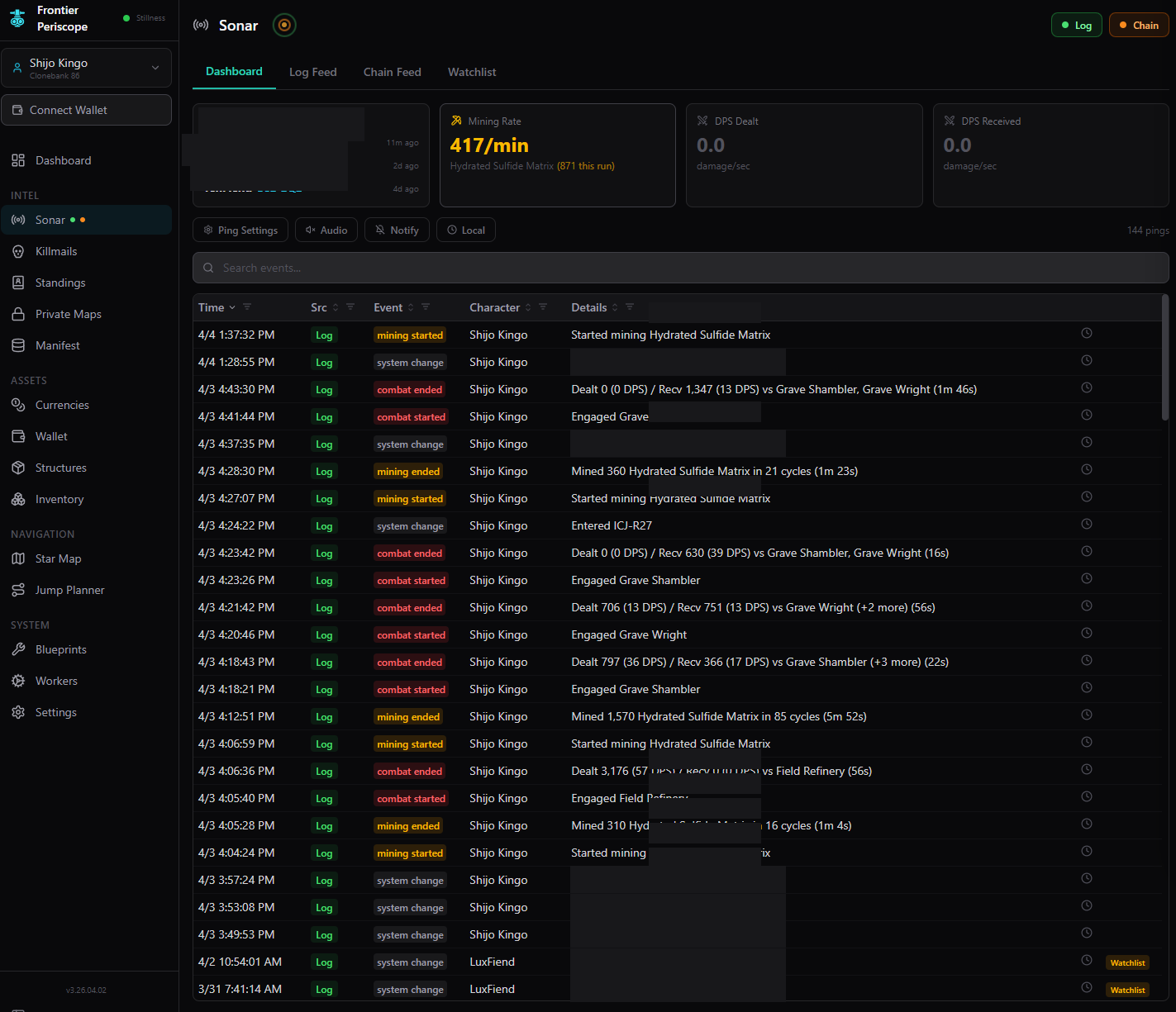
Real-time monitoring from blockchain polling and local game log tailing. Tracks combat, trades, fuel, gate activity, mining efficiency, and live DPS. Different alert sounds for cargo full, under attack, and other events. Configurable watchlists.

Structures

Monitor and manage owned deployables with fuel tracking, extension deployment, and location lookup from public reveals and private maps.

Star Map & Navigation

3D WebGL solar system visualization with jump route planning. Route by fewest jumps, shortest distance, or prefer gates, with waypoints, avoidance lists, and fuel estimates.

Killmails

Combat event tracking and threat assessment across the cluster.

Build a Player-Run Economy

A tribe, a coalition, or a loose network of solo players in the same region can create a custom currency, pay miners for raw materials through buy orders, and sell manufactured goods and ships priced in that same currency. Standings control who can trade. Encrypted maps keep infrastructure hidden from enemies. The full economic loop, from ore in the ground to ships on the market, runs on-chain through atomic escrow with zero trust required.

Step 1

Create Your Currency

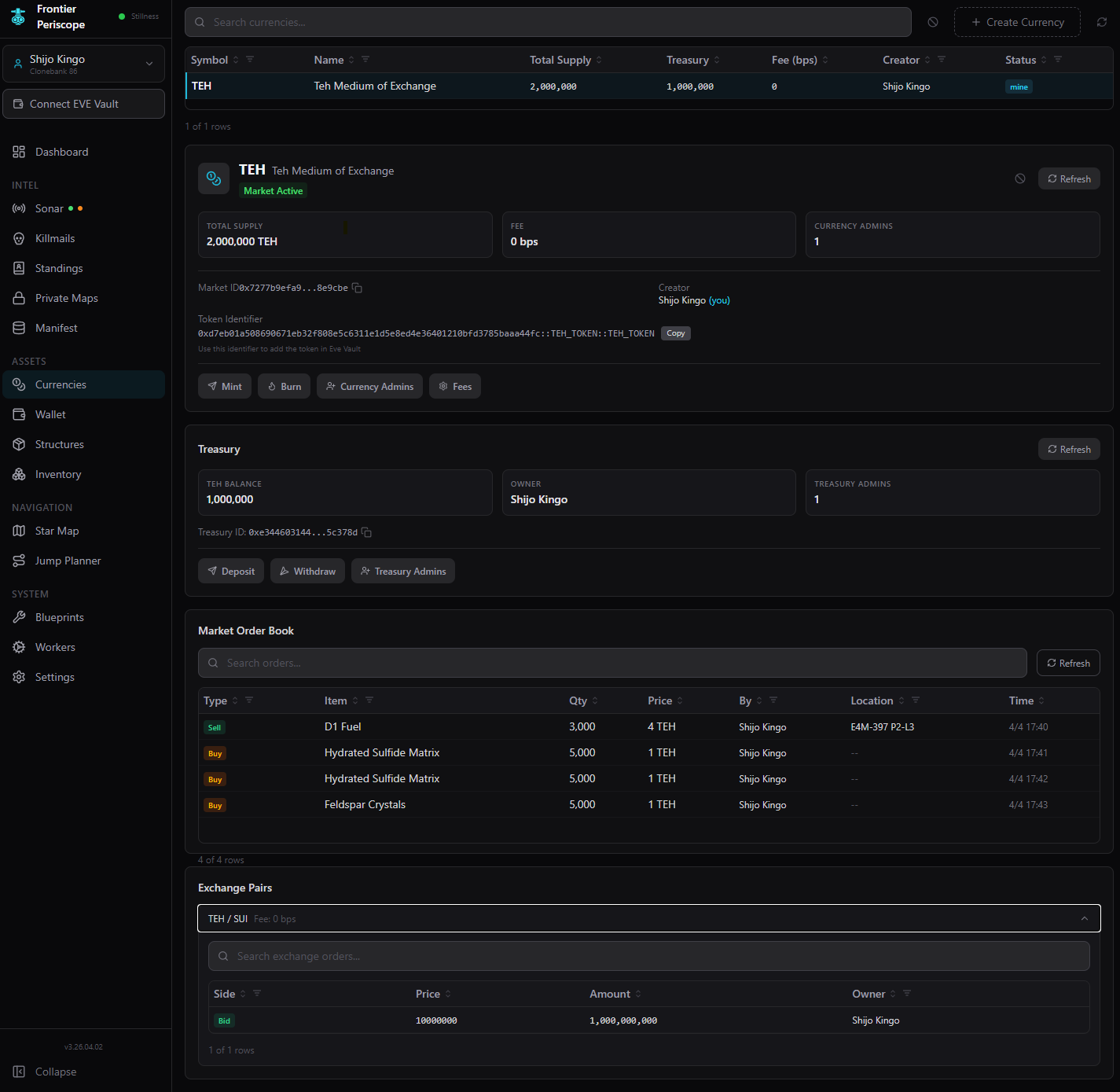
Publish a custom token directly in your browser. No CLI tools, no gas station, no dev environment. Pick a name and symbol and Periscope patches the Move bytecode and deploys the contract on-chain. This creates both the token and its Market object in a single transaction. Mint the initial supply and deposit it into a shared treasury that your group's leadership can manage together. Multiple admins, multi-currency balances, open deposits from anyone, and admin-only withdrawals. Works the same whether you're a single tribe, a coalition of allied tribes, or a handful of solo players running a local economy.

Currencies page showing custom token with treasury and market
Step 2

Put Currency Into Circulation

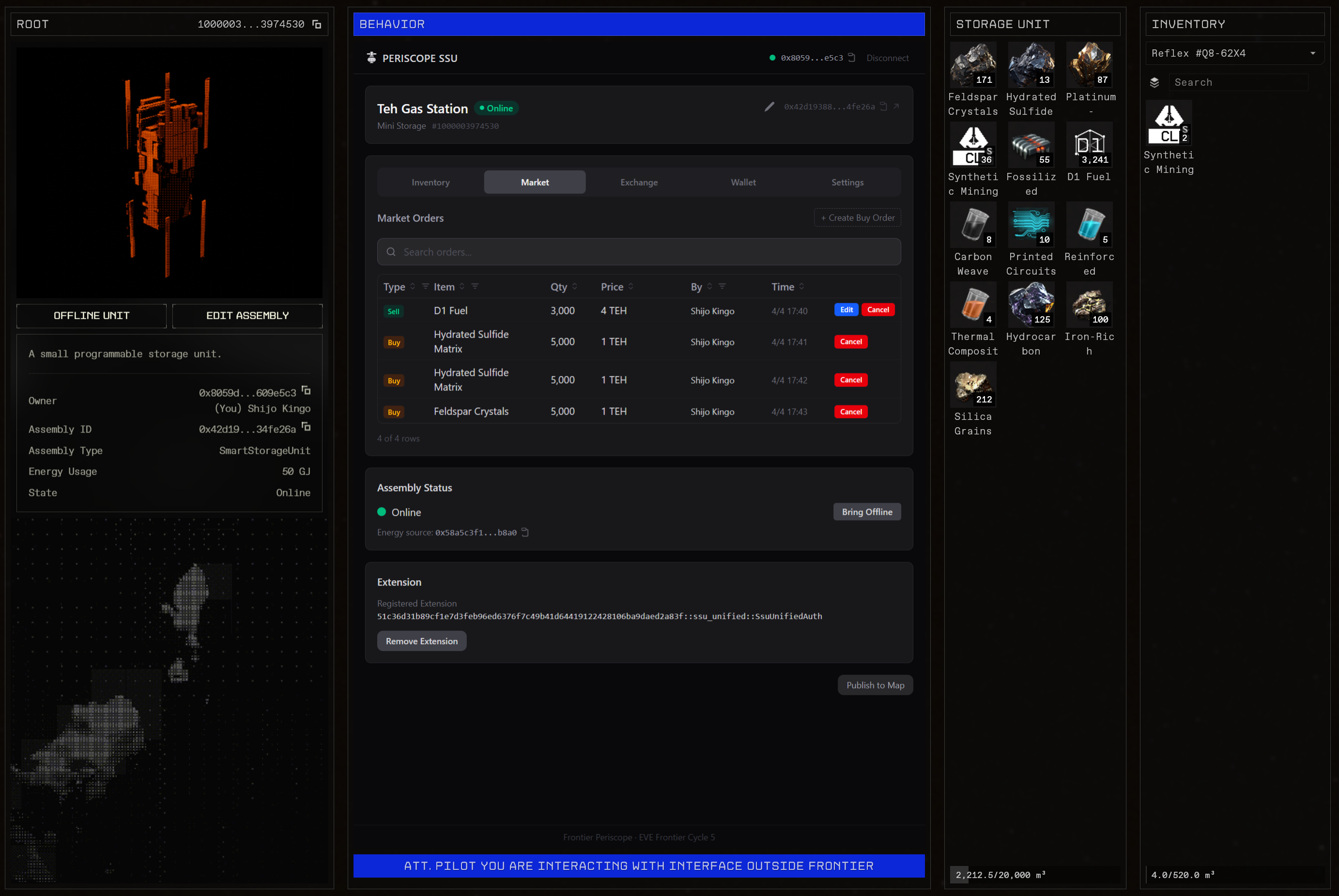
Post buy orders at your Smart Storage Unit offering your custom currency for ore, minerals, salvage, or any raw material your operation needs. Miners browse your open orders, haul the materials to your SSU, and fill the order. Payment and delivery happen atomically in one transaction. The miner receives your currency and the materials land in your inventory at the same time. No trust required, no middleman. The miner now holds your currency and you have the raw materials you need. This is the primary way currency enters circulation: players earn it by supplying your operation. They can also acquire it by trading SUI on the peer-to-peer exchange, but buy orders are how you build a working supply chain.

SSU dApp market tab with buy orders and sell listings
Step 3

Sell Ships and Manufactured Goods

Now that miners are earning your currency, give them somewhere to spend it. Builders from your tribe, allied groups, or even independent crafters take the raw materials from step two, manufacture fuel, ammunition, ship components, or assembled ships, and list them for sale at another SSU priced in the same custom currency. A miner who filled a buy order for ore can turn around and buy the fuel or ship they need without ever touching SUI. Builders who need more raw materials spend the currency they earned selling manufactured goods to buy the next batch of ore. The loop closes: raw materials flow in, manufactured goods flow out, and the currency circulates between miners, builders, and the shared treasury.

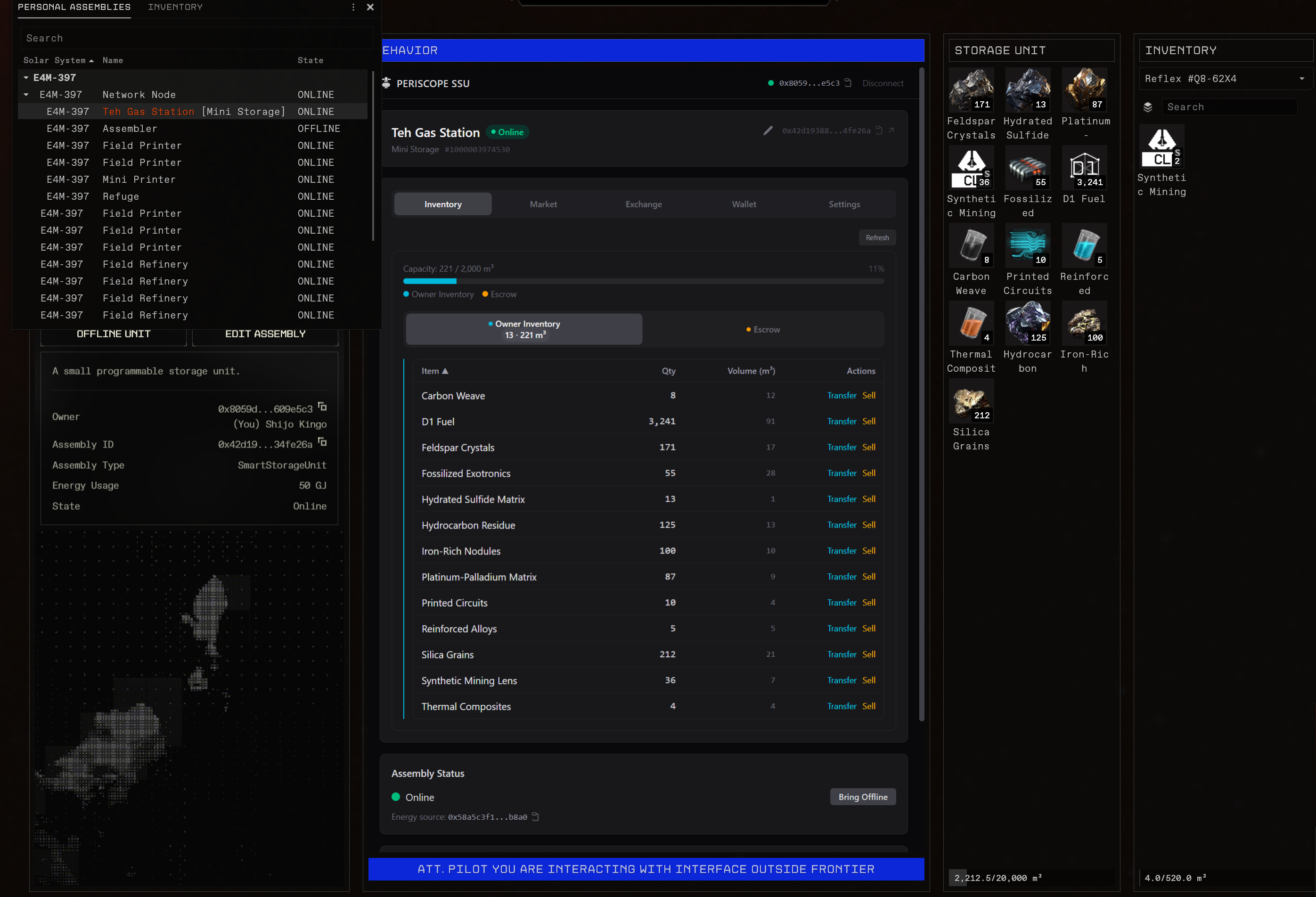
SSU dApp showing inventory and item management
Step 4

Control Access with Standings

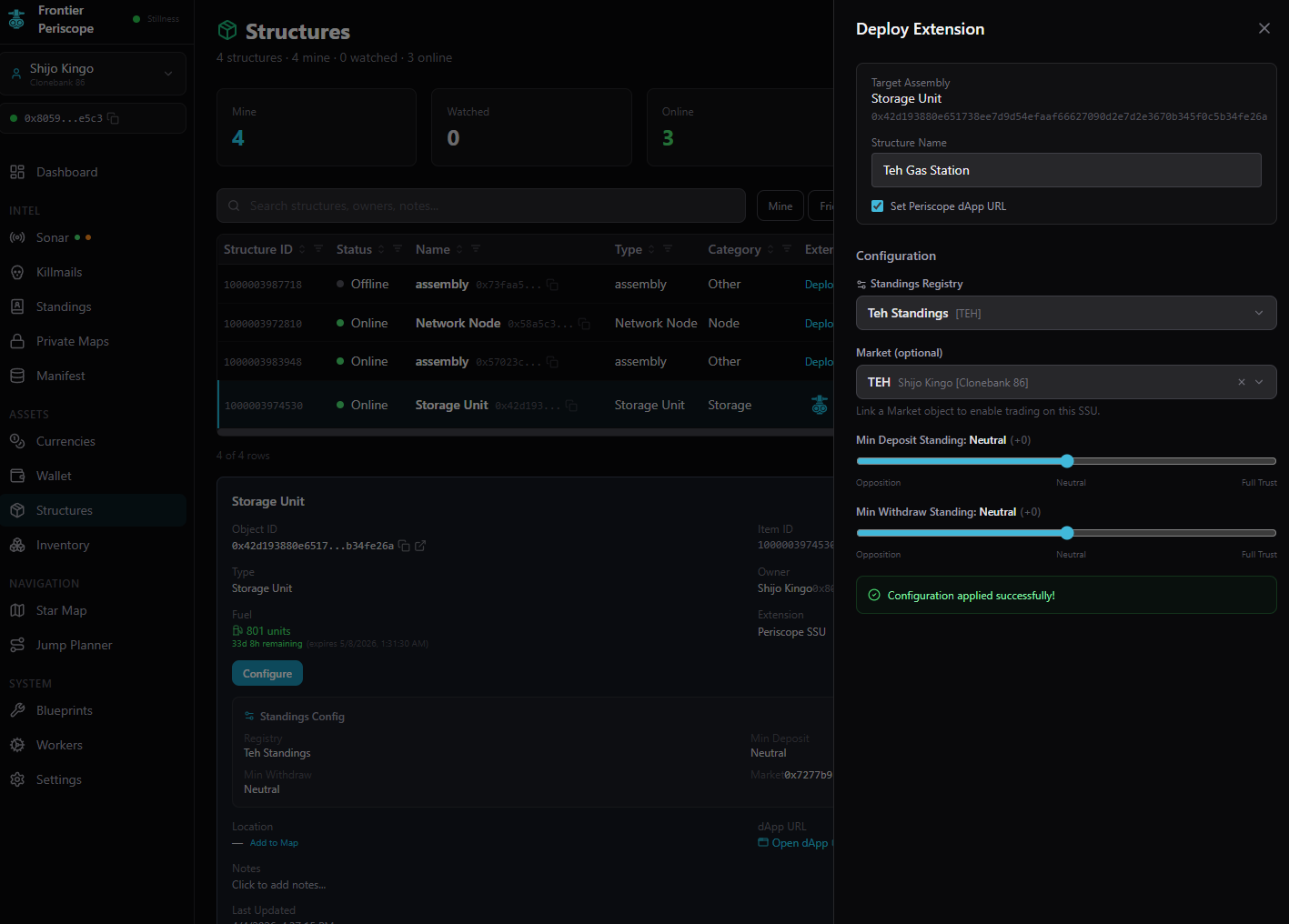
Link a standings registry to your markets, gates, and storage units. Set standings per tribe or per individual character, so a coalition of allied tribes all get access, or you can whitelist specific solo players you trust. Neutral players can be allowed to fill buy orders but blocked from purchasing manufactured goods. That's useful for recruiting independent miners without giving away your best gear. Hostile factions are locked out entirely. Gate tolls in your custom currency add another way to circulate it. Travelers pay to pass and that revenue flows into the shared treasury. One standings change cascades across every structure you own. Set a whole tribe to Ally and every member instantly gains access to all your markets and infrastructure.

Deploy Extension panel with standings configuration
Step 5

Share Infrastructure Privately

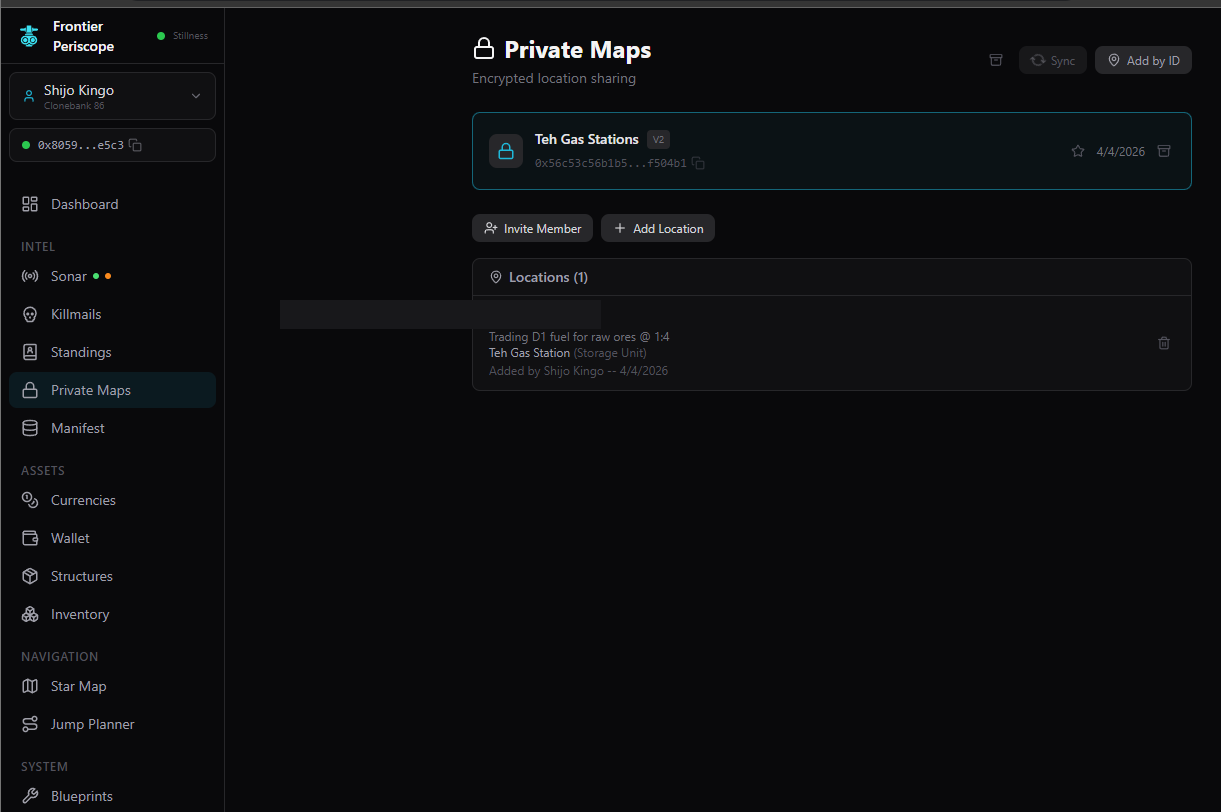
Miners need to know where your buy-order SSU is located. Builders need to find the materials depot. But you don't want enemies knowing where your infrastructure sits. Publish structure locations to an encrypted private map. Data is sealed with X25519 encryption derived from wallet signatures, so there's zero key management. Only invited members can decrypt and see the coordinates. Advertise what you're buying, what you're selling, and at what prices without revealing your position to the whole chain.

Private Maps page with encrypted location sharing
Step 6

Monitor Everything

Sonar tracks real-time events from both the blockchain and your game logs. See when buy orders get filled, when someone docks at your SSU, when fuel is running low, or when a hostile enters your system. Mining rates, combat DPS, gate activity, and trade events all stream into one feed with different alert sounds. Cargo full plays a warning alarm and taking fire triggers a threat pulse. Set up watchlists for your structures and never miss an event.

Sonar dashboard with mining rate and combat events

In Action

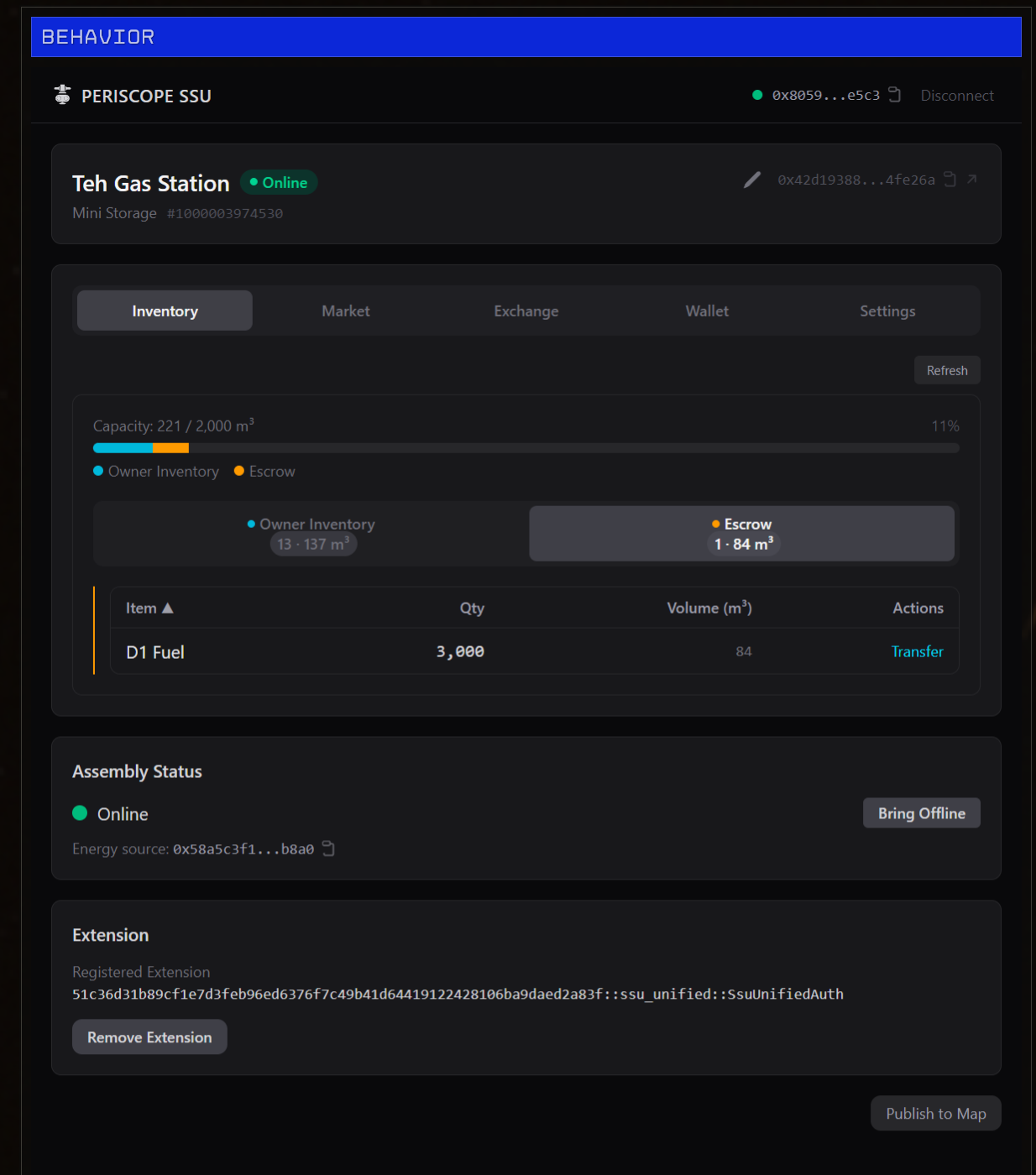
SSU dApp inventory view inside EVE Frontier

The Periscope SSU dApp loaded inside EVE Frontier's in-game browser, showing the full inventory of a Smart Storage Unit.

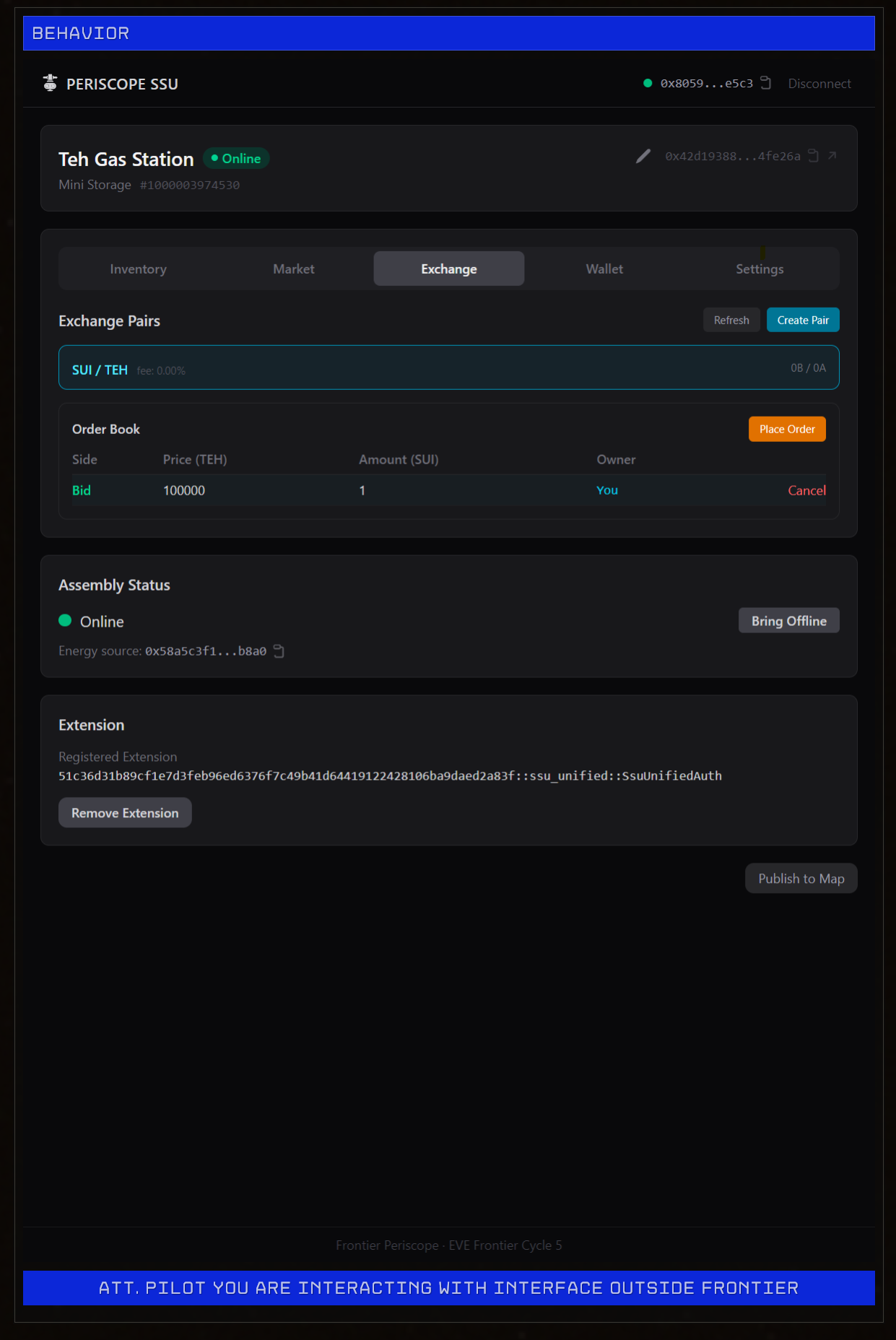
Exchange tab with SUI/TEH trading pair

The in-game exchange interface for trading between currencies. Players buy your custom currency with SUI before shopping at your market.

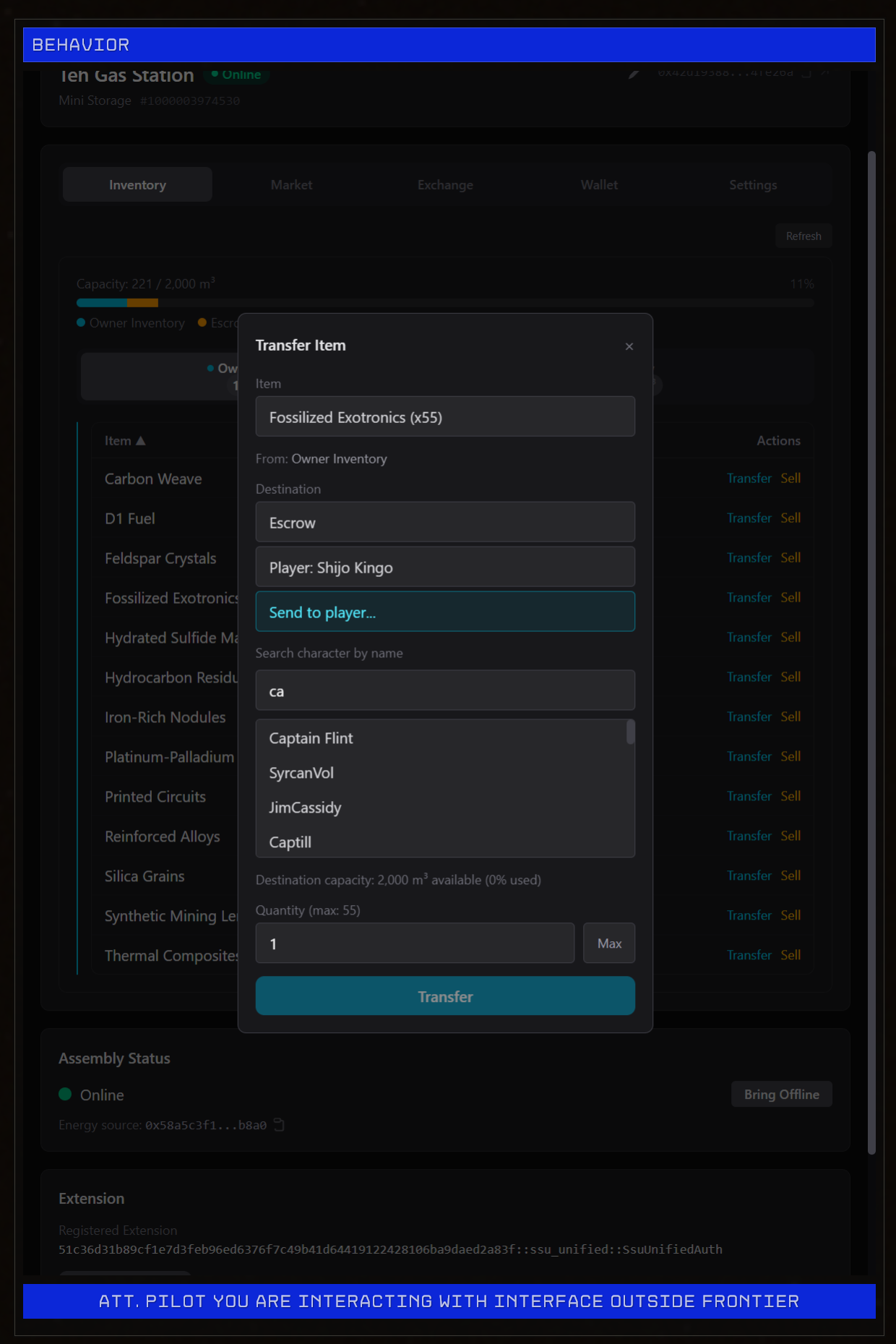
Player-to-player item transfer dialog

Player-to-player item transfer with character search autocomplete. Send directly to a player's inventory or through escrow.

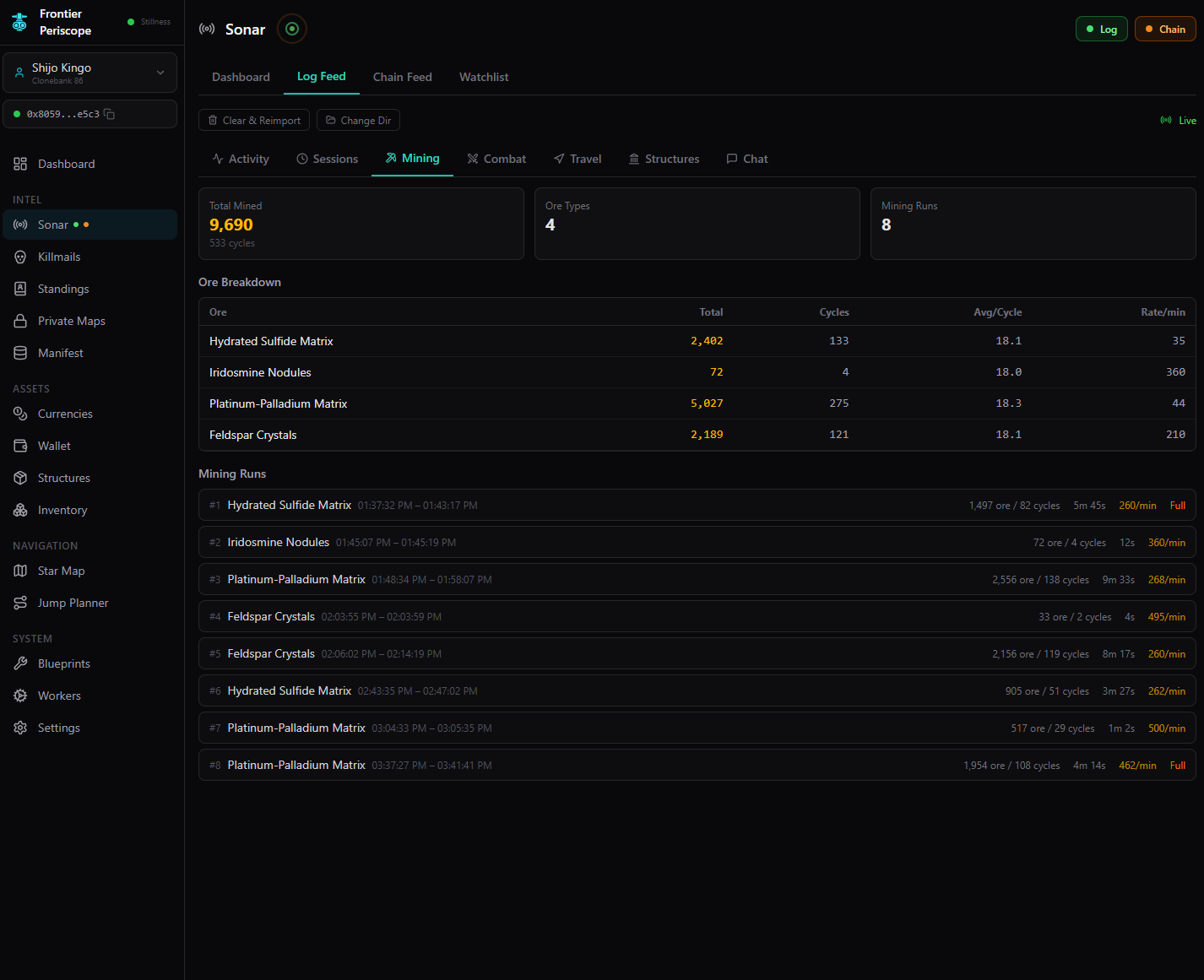
Mining analytics with ore breakdown and run history

Mining analytics showing total ore mined, breakdown by type with rates per minute, and individual run history with yield calculations.

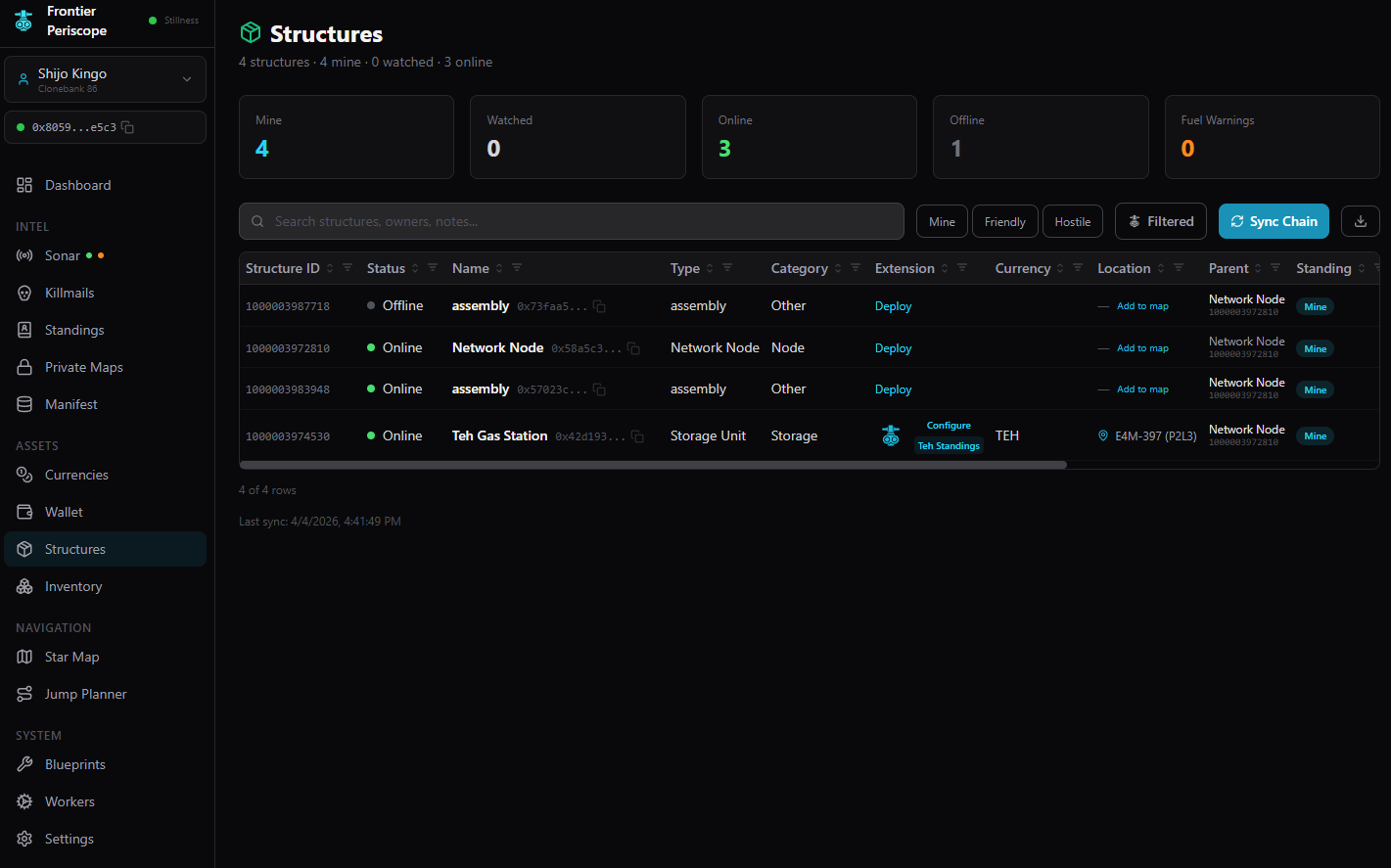
Structures overview with status tracking

Structure management overview showing online/offline status, fuel warnings, and chain sync for all your deployables.

SSU dApp compact view with escrow transfer

The compact SSU dApp view with inventory management, extension details, and the Publish to Map button for sharing locations.

Install Periscope

Run Periscope as a standalone desktop app. No installer required.

1

Open Periscope in Chrome or Edge

Go to app.frontierperiscope.com. No account or sign-up required.

2

Install from the browser menu

Chrome: Click the menu > Cast, save, and share > Install page as app

Edge: Click the menu > Apps > Install Frontier Periscope

3

Click "Install" in the prompt

Periscope opens in its own window. A shortcut is added to your desktop and start menu automatically.

Prefer the browser? Periscope works just as well in a regular tab. Bookmark app.frontierperiscope.com and you're set.

Fully Client-Side

No backend. No accounts. No tracking. Periscope runs entirely in your browser. Data stays in local IndexedDB and talks directly to public Sui and EVE Frontier endpoints. No server to maintain, no hosting costs, and no single point of failure.

8

Move contracts deployed

0

Backend servers

2

Data sources (chain + game logs)

100%

Your data stays local

Requirements

Chrome or Edge required for local game log monitoring (File System Access API). For on-chain transactions, install the EVE Vault browser extension.

EVE Vault is optional. Read-only features like Star Map, standings, killmails, and log analysis work without it.